

Quantum computing simulators are software tools that emulate the behavior of quantum systems on classical hardware, allowing researchers and developers to design, test, and refine quantum algorithms without physical quantum processors.
Among the various simulator architectures, state-vector (SV) simulators are the most widely used. These simulators store the entire quantum state and calculate its evolution, making them universal and ideal emulators of quantum computers.
All figures below are BlueQubit's own benchmarks, run on layer-structured random circuits with alternating single-qubit gates from {X, Y, Z, H, S, T} and two-qubit gates from {CNOT, CZ}. Other simulators have strengths these circuits don't measure: Qiskit Aer and Cirq/qsim are more flexible for local development, PennyLane leads on differentiable workloads, and cuQuantum's tensor-network mode handles qubit counts no state-vector simulator can reach.
As a tool that mimics quantum systems, a quantum simulator allows researchers to explore quantum applications, debug algorithms, and understand qubit behavior without the cost and complexity of physical quantum processors.
This is especially valuable given that access to actual quantum devices remains limited by availability, queue times, and location. Below is an overview of the main types of quantum simulators in use today.
Analog quantum simulators use physical systems, such as cold atoms, trapped ions, or photons, to replicate quantum interactions. This approach is especially effective for studying many-body systems and quantum phase transitions in condensed matter physics, where collective behavior emerges from all-to-all interactions that are costly to simulate classically. For example, researchers can use trapped ions to simulate spin systems or cold atoms in optical lattices.
Analog simulators are highly specialized and limited to simulating specific types of quantum systems. This tends to limit their flexibility. Scaling them to larger systems is also an issue due to control complexity. As the number of particles or qubits increases, maintaining precise control over the system becomes more complicated.
Another challenge for analog systems is achieving high precision and resilience to environmental noise. Slight variations in parameters lead to inaccurate results, while noise disrupts the delicate quantum states the simulator is meant to emulate. These factors make analog simulators unsuitable as universal quantum simulators, though they remain highly effective for specific tasks.
Digital quantum simulators use quantum gates and algorithms to simulate quantum systems through discretization. Because they are programmable, they can address a wider range of problems than analog devices and are better suited to general-purpose simulation workflows. In practice, researchers use them to implement standard algorithms, such as Shor’s algorithm for factoring and Grover’s search algorithm, and to run variational routines for optimization, cryptography, and quantum chemistry.
The downside is resource intensity. Simulating large circuits classically becomes expensive quickly: memory and runtime requirements grow exponentially with the number of qubits, which makes highly entangled states hard to model at scale. Digital simulators also rely on classical hardware to mimic quantum behavior, which inherently limits their performance compared to fully quantum solutions.
This is why hybrid approaches, such as combining classical simulation for verification with access to quantum backends for larger instances, are common in real workflows.
As the name suggests, hybrid quantum simulators combine classical computing and quantum systems to solve complex problems. Classical systems perform pre- or post-processing, while quantum simulators handle specific calculations that require quantum speedups. This split is common in near‑term workflows for optimization, machine learning, and chemistry, where classical control loops coordinate many short quantum runs.
Hybrid simulators depend on classical systems for computations that are not suitable for quantum processing. This can slow down performance and create bottlenecks. Integrating classical and quantum systems can also increase the risk of errors due to the complexity of coordination and synchronization. Despite their great potential, hybrid approaches are still in the early stages of development and need a lot of refinement to achieve seamless integration.
Tensor network simulators use tensor networks to represent quantum states, which is highly efficient for simulating many-body quantum systems. This makes them especially effective for one-dimensional spin chains and related condensed-matter models, where entanglement grows slowly, and tensor contractions remain tractable. In practice, they are widely used in materials science and in quantum chemistry for ground-state and low-energy calculations on structured problems.
While tensor network simulators are quite efficient for systems with low or moderate entanglement, they struggle with highly entangled or complex quantum systems. Their reliance on tensor representations means that storage and computational costs grow as the dimensionality or entanglement of the system increases.
Because of this, tensor network methods are less versatile for highly entangled circuits or algorithms that require broad superpositions, such as many cryptography-related routines, where other simulation or quantum-backbone approaches scale better.
They remain a strong choice for targeted, low-entanglement workloads, but not a universal tool across all quantum computing applications.
A quantum circuit simulator is a software tool that models how quantum gates act on qubits over time, tracking the evolution of the quantum state as the circuit executes. Most circuit simulators use a state-vector representation, where the full quantum state is stored as a complex vector of size 2ⁿ for n qubits, and each gate application updates this vector via matrix-vector multiplication.
Circuit simulation works by initializing a state vector (usually |00…0⟩), then applying gates in sequence according to the circuit definition. Single-qubit gates affect two amplitudes at a time, while two-qubit gates like CNOT or CZ affect four amplitudes. The simulator updates the state after each gate, optionally adding noise models or sampling measurements at the end.
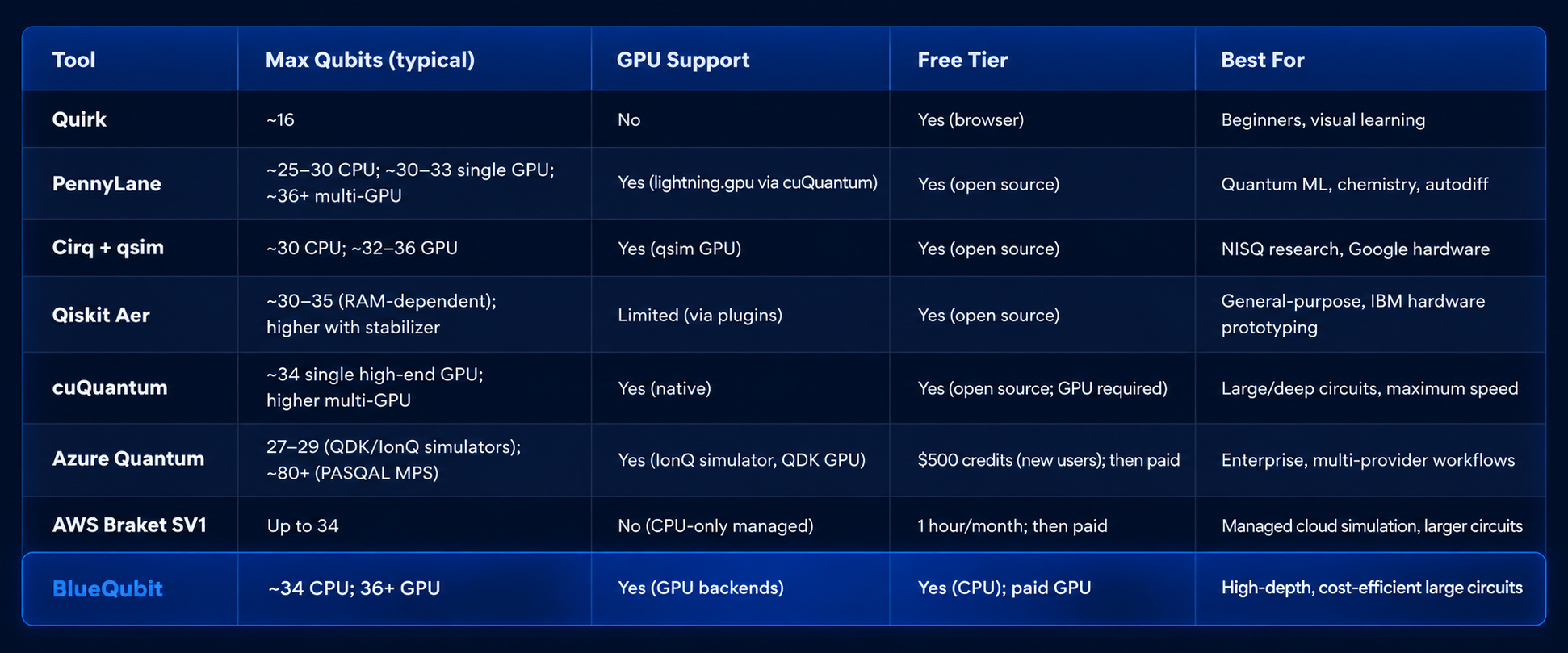
Popular tools that perform circuit simulation include Qiskit Aer, Google's Cirq with qsim, AWS Braket's SV1, cuQuantum, PennyLane's Lightning backends, Microsoft's Azure Quantum simulators, and browser-based visual tools like Quirk. These vary in maximum qubit counts, GPU support, and whether they run locally or in the cloud.
If you want to run a circuit immediately with minimal setup, here is a straightforward path:
This workflow lets you go from zero to a running simulation in under 15 minutes, even on a laptop for small circuits.
Quantum computer simulators are essential tools for experimenting with quantum algorithms and systems without needing a physical quantum computer. Let’s dive into some of the most popular simulators in the field.
Amazon Braket is AWS's managed quantum computing service, providing three on-demand simulators alongside access to real hardware from IonQ, Rigetti, IQM, and QuEra. SV1 is the general-purpose state-vector simulator; DM1 handles noise via density-matrix simulation; TN1 is a tensor-network simulator for larger circuits with suitable structure. The Braket SDK also ships a free local simulator that needs no AWS account.
BlueQubit offers both a free CPU version and a GPU version for advanced users who need top performance. To boost simulation speeds, it uses quantum computing software like Google's qsim and Nvidia’s cuQuantum library, making it a great option for large, complex quantum circuits.
Quirk is a browser-based, drag-and-drop quantum circuit simulator designed for learning and quick visualization. It runs entirely in the web browser with no installation, updating the state vector in real time as you add gates.
PennyLane is a cross-platform Python library for quantum machine learning and quantum chemistry, with multiple simulator backends including default.qubit, lightning.qubit (CPU), and lightning.gpu (GPU via cuQuantum).
Cirq is Google's Python framework for designing and running quantum circuits, paired with qsim, a high-performance state-vector simulator optimized for both CPU and GPU execution.
qsim is Google's high-performance state-vector quantum circuit simulator, optimized for both CPU and GPU execution and designed to handle large, deep circuits efficiently. It can be used standalone or as the simulation backend for Cirq circuits.
Qiskit Aer is IBM's high-performance simulator backend for the Qiskit SDK, offering state-vector, density-matrix, and stabilizer simulation modes with optional noise modeling.
cuQuantum is NVIDIA’s GPU-accelerated quantum simulation SDK, now spanning five libraries: cuStateVec (state vector), cuTensorNet (tensor network), cuDensityMat (quantum dynamics), cuPauliProp (Pauli propagation), and cuStabilizer (stabilizer simulation). It also powers other tools on this list — qsim's GPU backend and PennyLane's lightning.gpu both build on it.
Azure Quantum is Microsoft’s cloud platform that provides access to multiple quantum hardware providers (IonQ, Quantinuum, Rigetti, Pasqal, and others) along with built-in simulators from the Quantum Development Kit (QDK). It supports both local and cloud-based simulation, making it suitable for development, testing, and running jobs on real quantum hardware.
Choosing the right quantum simulator depends on your goals, hardware access, and circuit size. Here are direct recommendations for common scenarios:
Two popular hosted quantum simulators are provided by AWS Braket and BlueQubit. Both are easy to use and require zero setup. Users only need to connect their account with the corresponding Python SDK to submit large quantum circuits for simulation—much larger than what can typically be handled by an average laptop.
Here’s a runtime comparison for 32×32 circuits (layer-structured random circuits with alternating layers of single-qubit gates from {X, Y, Z, H, S, T} and two-qubit gates from {CNOT, CZ}) across the platforms we tested.
AWS Braket SV1 holds up well as a managed service, but BlueQubit’s BQ-CPU is roughly 12.7× faster, and their BQ-GPU pulls ahead by about 58× on the same 32×32 circuits (based on BlueQubit’s benchmarks).
%2520(5).svg)
To get a clearer picture, we also ran circuits from 23×23 up to 35×35.
As expected, state-vector simulators scale exponentially with the number of qubits and roughly linearly with the number of gates, so the plots use a log scale on the Y-axis. We also show runtime per gate to make the comparison fairer across different depths.
.svg)
All the simulators follow that classic exponential-in-qubits pattern. You’ll notice BQ-GPU stays relatively flat after 32 qubits—that’s because BlueQubit starts throwing more GPUs at the problem. It costs more, but the speedup is significant.
Overall, the numbers show that BlueQubit’s GPU backend offers a clear performance advantage over CPU-only managed options like AWS Braket SV1 on these large and deep circuits, while other tools remain strong choices for local development, education, and specialized workflows.
Aside from the square circuits, we also wanted to see how the simulators handle deeper ones. There’s a practical reason the speedups can look even bigger here. State-vector simulators have a fixed cost just to allocate the memory for the state. On high-qubit but shallow circuits, that allocation cost often dominates the total runtime. Once the circuits get deeper, the actual gate-by-gate simulation time becomes the main factor. That’s exactly where GPU acceleration shines.
On a square 34×34 random circuit, BQ-GPU runs approximately 230× faster than AWS Braket SV1. When we tried a much deeper 34×200 random circuit, the gap widened to around 560×.
.svg)
One more practical note: if raw speed isn’t the top priority, BlueQubit’s free BQ-CPU option is still roughly 12.7× faster than Braket SV1. You can find the full list of supported devices and current pricing on the BlueQubit platform.
Quantum computer simulators matter because they let teams develop and test algorithms, optimization routines, and quantum error-correction methods without the constraints of physical quantum hardware or calibration cycles.
As the field of quantum computing advances, simulators also serve as a training environment for new quantum developers and a staging ground for workflows that will later run on quantum backends. Furthermore, they ignite the exploration of novel applications and interdisciplinary research, helping to bridge the gap between quantum theory and real-world implementation, ultimately accelerating the arrival of the quantum era.
For the circuit notation these simulators execute — gate symbols, measurement, and how to read a circuit diagram — see our introduction to quantum circuits.
BlueQubit’s quantum simulators build on open-source libraries such as qsim and NVIDIA cuQuantum to deliver GPU-accelerated circuit simulation with lower operational overhead than many managed services. This makes them a practical option for running large, high-depth circuits in the rapidly advancing field of quantum computing.
Yes, it is possible to simulate a quantum computer using classical systems, but only for a limited number of qubits. Quantum simulators mimic quantum behavior by replicating qubit operations and quantum gates. As the number of qubits increases, however, so does the computational demand. This makes simulations impractical for larger systems. Quantum simulators come in handy for research, testing quantum algorithms, and trying out small-scale quantum applications before implementing them on actual quantum hardware.
For beginners and most researchers, Google’s Cirq (with qsim) is an excellent free, open-source option that makes it easy to design and simulate quantum circuits locally. cuQuantum is built for high-performance, GPU-accelerated simulation and is a strong choice when you need to run large or deep circuits quickly.
BlueQubit offers a managed simulation platform (CPU and GPU backends) as part of its Quantum Software-as-a-Service, so you can run bigger circuits without managing hardware yourself; it also provides access to real quantum processors for testing algorithms.


